Plan the gig. See what needs attention.
Build the lineup and set, plan rehearsals, and give each player the details they need.

Access for the assigned guest
Selected details for audiences
Get started
Start with one gig.
Once your band’s workspace and access are set up, start with a show you already have planned.
Add your musicians
Save instruments and language preferences. Enable member access where needed.
Set up the gig
Choose or add a venue. Set the date and call time, then assign players and roles.
Build the set
Choose songs and keys from the connected catalog. Add cues and rehearsal notes.
Check, then share
Preview the player’s assignment and materials. Review and send the gig message, or share the appropriate access link.
What can wait?
Promotion, recurring gigs, calendar subscriptions, and custom message templates can wait.
What can I reuse?
Reuse player profiles, venues, set lists, recurring gig patterns, music, preferences, and message templates as you need them.
For the next show, copy a set or gig, update the lineup and call time, check missing parts and conflicts, and review messages and promotion changes.
What about my files and calendars?
Keep your source arrangements and PDFs in their managed folders. BandPocket reads the music catalog; Charts Sync handles reviewed material updates. Calendar connections and subscriptions require setup. Existing calendars and files are not automatically migrated.
Enable or revoke portal access, or archive a musician’s profile, without changing completed-gig records. See access and history details.
Build the performance
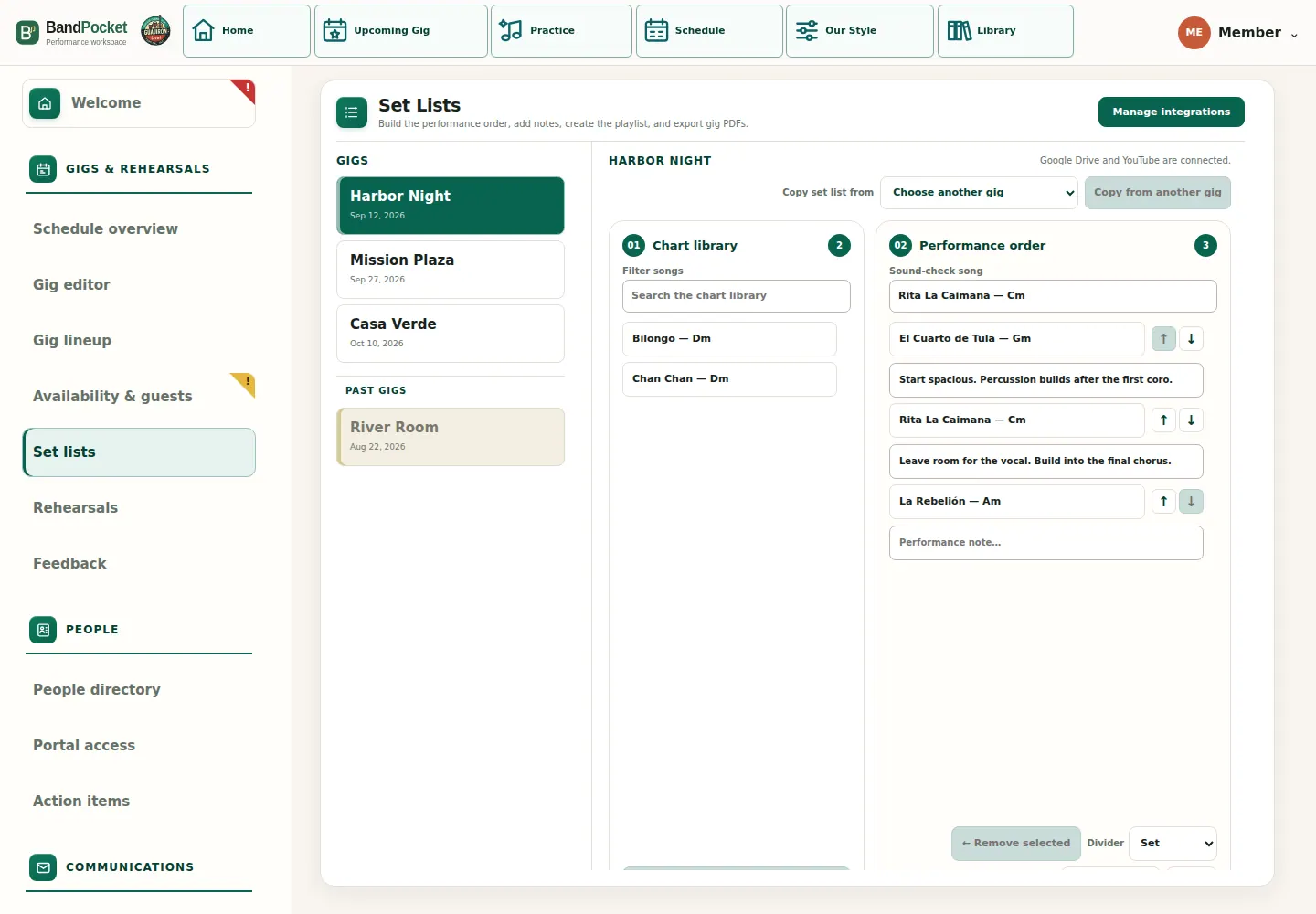
Build the set. Put notes beside each song.
Add or reorder songs and set markers using the catalog’s current keys. Put cues, entrances, endings, and arrangement notes beside each song; players see them in Practice.


Copy a previous set, then add a gig-specific note such as “Leave room for the vocal.”
The player sees that song’s note beside their chart, lyrics, and video in their saved language.
Actual product screen
Create and manage each gig in one place.
Set the venue, call time, required roles, tickets, and public sharing controls in the Gig Editor.
Update the gig, then check its remaining gaps and any messages or connected services that need attention.
Keep gig changes visible
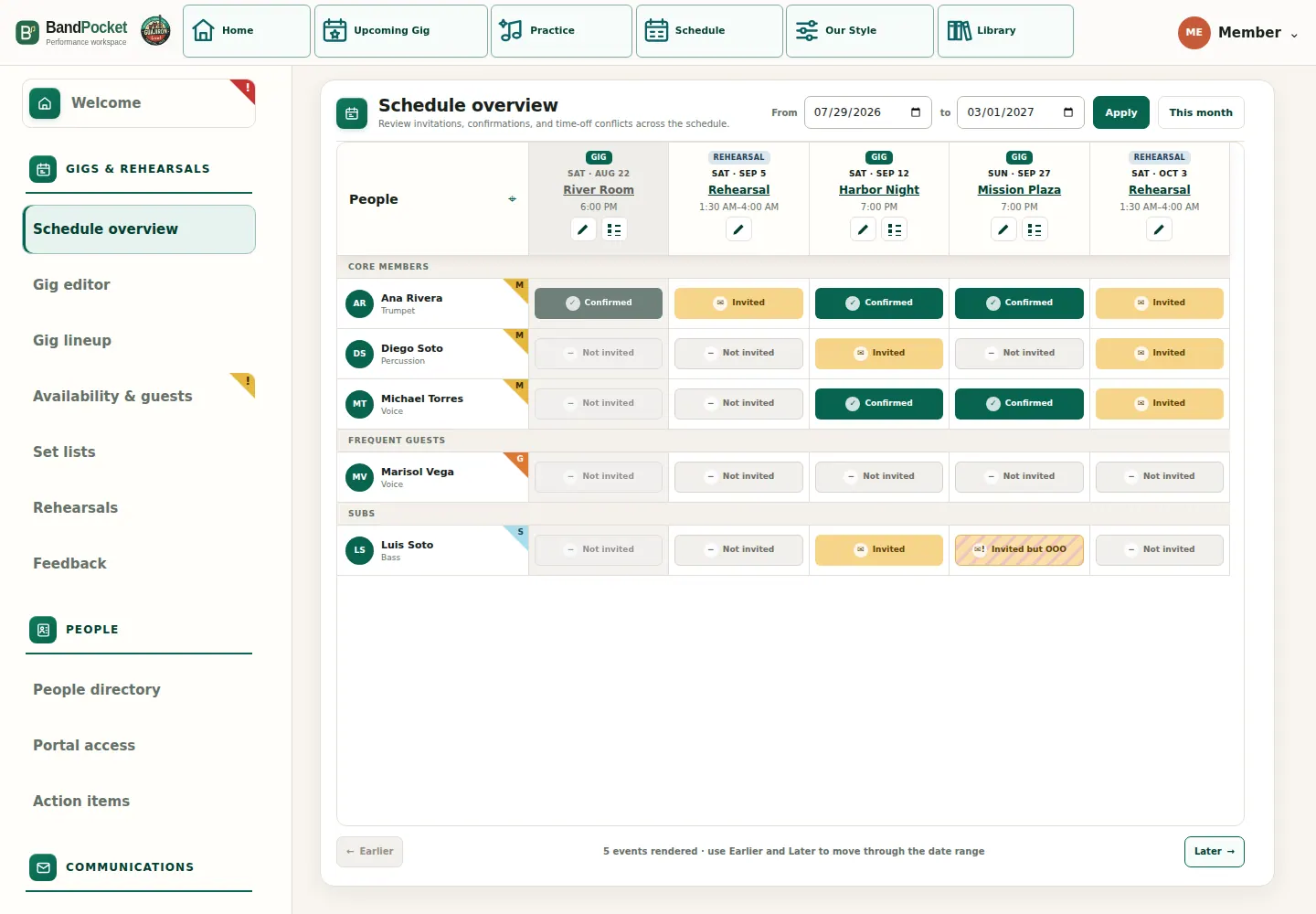
See the whole schedule
Coverage, responses, and conflicts at a glance.
Use a date-range view across gigs and rehearsals to see who is confirmed, invited, not invited, or unavailable before a gap becomes urgent.

Focus on what needs attention
See what needs attention.
The Manager home brings together what needs attention across gigs, rehearsals, materials, feedback, communication, access, bookings, listings, and reported problems.

The work surrounding the music
Coordination does not stop at the set list.
BandPocket connects communication, public promotion, booking follow-up, and the materials workflow in one place.

Review band messages.
Create personalized bilingual messages for gigs, rehearsals, feedback, tasks, calendars, and repertoire. Review them before sending, then keep the delivery results.
Send band updates →Promote the show.
Keep selected public shows in sync across newsletters, outreach, posts, ticketing, and local listings, and verify that the details match.
Promote the show →Prepare the music your players need.
Prepare scores, chords, instrument parts, practice videos, and stable links. Review the changes in Charts Sync before publishing.
Explore chart managementCustom communication to band members
Send each player the updates they need.
Create bilingual drafts for a specific gig, rehearsal, task, calendar setup, repertoire change, or the whole week. Review the recipients and content, then send now or schedule the approved batch.
Google Calendar + Apple Calendar
Keep personal calendars up to date.
BandPocket supports ordinary Google Calendar events and invitations for gigs and rehearsals, plus separately enabled automatic subscription calendars for eligible Core Band Members.

Your gigs in Google Calendar
Open your private band calendar from Schedule. BandPocket adds your assigned gigs and all rehearsals and keeps them up to date in a separate Google Calendar shared with you.
Your gigs in Apple Calendar
Choose Apple Calendar from Schedule to subscribe to your assigned gigs and all rehearsals. Your personal calendar feed is private and revocable, with an unguessable subscription link.
Automatic subscription calendars are for enabled active Core Band Members. Frequent Guests and Substitutes receive ordinary event invitations instead.
Calendar setup
Connect Google Calendar and enable calendar subscriptions separately. Apple Calendar uses a private webcal feed; Google Calendar uses a separately shared calendar. Review the confirmation before disabling a person’s sync and deleting their calendar.